Developer
App OAuth Token
App OAuth Token
Warning
This flow is only for server-side apps with Scoped OAuth functionality
A client_secret should be treated as a password and stored securely. It should never be stored in public code.
About App OAuth Tokens
To act on a PagerDuty Account as a PagerDuty App, you must obtain an app token for that account. A token is only issued if the application has been previously granted access to that account. Applications are implictly granted access to the account that created it.
Before proceeding you should register a PagerDuty App with Scoped OAuth functionality to obtain the client_id, client_secret, and scopes.
Obtaining an Access Token
A scoped app token is obtained by making an OAuth 2.0 client credentials request.
Send a POST request to https://identity.pagerduty.com/oauth/token with a Content-Type of application/x-www-form-urlencoded and the following form parameters:
| Parameter | Description |
|---|---|
grant_type | The OAuth 2.0 grant type. Value must be set to client_credentials |
client_id | An identifier issued when the Scoped OAuth client was added to a PagerDuty App |
client_secret | A secret issued when the Scoped OAuth client was added to a PagerDuty App |
scope | A space separated list of scopes available to the client. Must contain the as_account- scope that specifies the PagerDuty Account the token is being requested for using a {REGION}.{SUBDOMAIN} format. Currently accepted service regions are us or eu. |
The following curl request could be used to obtain an access token for the companysubdomain account in the us service region:
curl -i --request POST \
  https://identity.pagerduty.com/oauth/token \
  --header "Content-Type: application/x-www-form-urlencoded" \
  --data-urlencode "grant_type=client_credentials" \
  --data-urlencode "client_id={CLIENT_ID}" \
  --data-urlencode "client_secret={CLIENT_SECRET}" \
  --data-urlencode "scope=as_account-us.companysubdomain incidents.read services.read"
The JSON response includes the access token, the scopes that were actually issued to the token, and the number of seconds before the token expires.
{
  "access_token": "pdus+_EXAMPLE_KEY_ID_EXAMPLE_TOKEN",
  "scope": "as_account-us.companysubdomain incidents.read services.read",
  "token_type": "bearer",
  "expires_in": 86400
}
In the client credentials OAuth flow, it is not necessary to refresh an access token. When a particular access token expires, the application should simply request a new token.
Using an Access Token
The access token can be used to access the REST API as a PagerDuty App.
When making an API request, include the version of the API in the Accept header. Access tokens must also be sent in the request as part of the Authorization header along with the Bearer token type, using this format:
Authorization: Bearer pdus+_EXAMPLE_KEY_ID_EXAMPLE_TOKEN
Accept: application/vnd.pagerduty+json;version=2
A 403 - Forbidden response will be returned if the token does not contain the scope required to access a particular API endpoint
or the API endpoint does not yet support API Scopes. When the token expires a 401 - Unauthorized response will be returned
and a new token must be obtained.
Which APIs support Scoped OAuth?
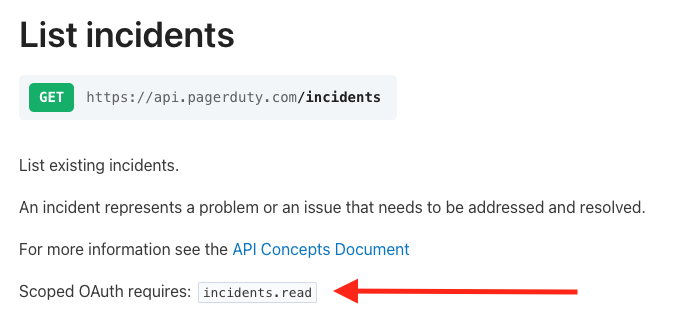
Each endpoint that supports Scoped OAuth indicates the required scope in its description in our API Reference. For example, the list incidents endpoint requires the incidents.read scope.