Developer
Global Event Rules API
Global Event Rules API
Important Note
Global Event Rules API v1 (Legacy): Our soon-to-be-legacy Global Event Rules API v1 is no longer receiving new features, and it will be fully deprecated at the end of 2020. We recommend replacing any integrations using the Global Event Rules API v1 with new integrations using our new Rulesets API to prepare for this change and to access new features.
Additionally, any ruleset that has new features enabled (such as Paused Incident Notfication or Dynamic Field Enrichment & Extraction) can only be interacted with using the new Rulesets API. A 406 error will be returned if any of the Global Event Rules API v1 endpoints are used on an event rule which has new features enabled, which may only be modified via the Rulesets API.
Definition
Event rules are used to configure what happens to an event that is sent to PagerDuty from your monitoring tools and other integrations. An event rule can suppress, set severity, set incident priority, add a note, and route an event to a service. When routing an event, an incident may be created on the target service.
All requests should be made to the /event_rules endpoint and must specify the following headers:
- Authorization: All REST API calls require Authentication. In order to make successful requests to the API, you must provide a valid form of authorization.
- Content-Type:
application/json - Accept:
application/vnd.pagerduty+json;version=2
Event Intelligence
Some API features are available as part of our Event Intelligence product. These include:
- The ability to use an event rule to add a note to an incident
- The ability to set up a threshold event rule
- The ability to have a scheduled or recurring event rule
List Global Event Rules
A GET request to /event_rules will return a list of all global event rules in your account. There are no parameters for this request.
There are some key elements to note in the response. Namely, each rule has an id. The id of a rule is important to note; it's required to update properties of that rule, or to delete the rule.
Parameters
None.
Sample Response
// List Rules
{
  "rules": [
    {
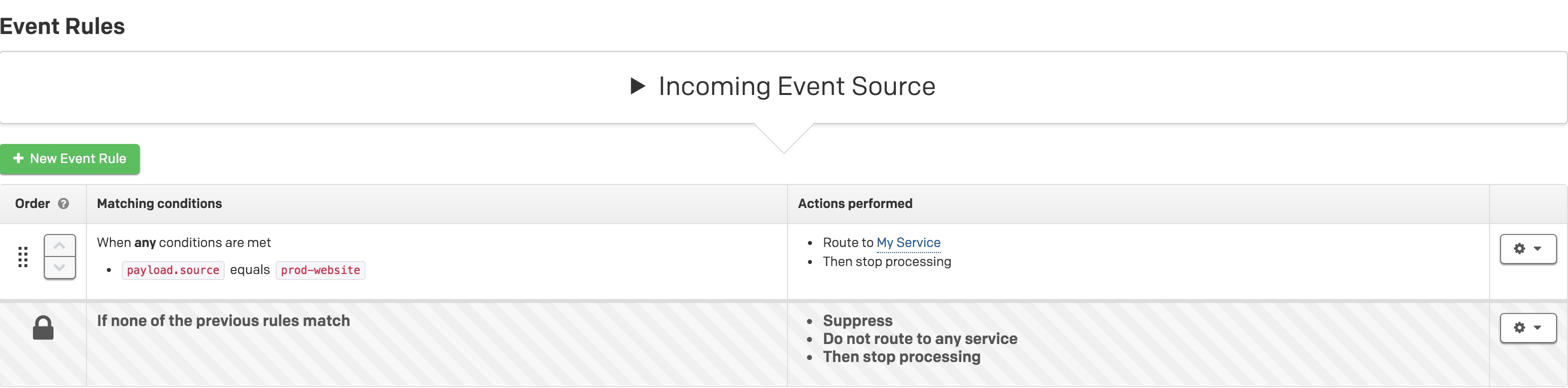
      "id": "6d53c1c5-a960-4c39-b675-3539039bd275",
      "condition": [
        "or",
        [
          "equals",
          [
            "path",
            "payload",
            "source"
          ],
          "prod-website"
        ]
      ],
      "catch_all": false,
      "advanced_condition": [],
      "actions": [
        [
          "route",
          "PYZDVUB"
        ]
      ]
    },
    {
      "id": "daf1f0e0-0480-4730-ba87-14ec00e15bdd",
      "catch_all": true,
      "advanced_condition": [],
      "actions": [
        [
          "suppress",
          true
        ]
      ]
    }
  ],
  "object_version": "JRm2lJc3S8u4pwpR1w9ScLA5.BQogPF2",
  "format_version": "1",
  "external_id": "<Global routing key>"
}
Displayed in the UI
Other Fields
| Name | Description |
|---|---|
object_version | The revision number of the account’s current ruleset. This changes every time the ruleset changes. |
format_version | This is the version number of the event rules schema. If any significant changes to the schema happen, this version will be bumped and the schema changes documented. There are no immediate plans to change this schema. |
external_id | The global event rules routing key. |
Create a Global Event Rule
A POST request to /event_rules will create a new global event rule.
Condition Parameter
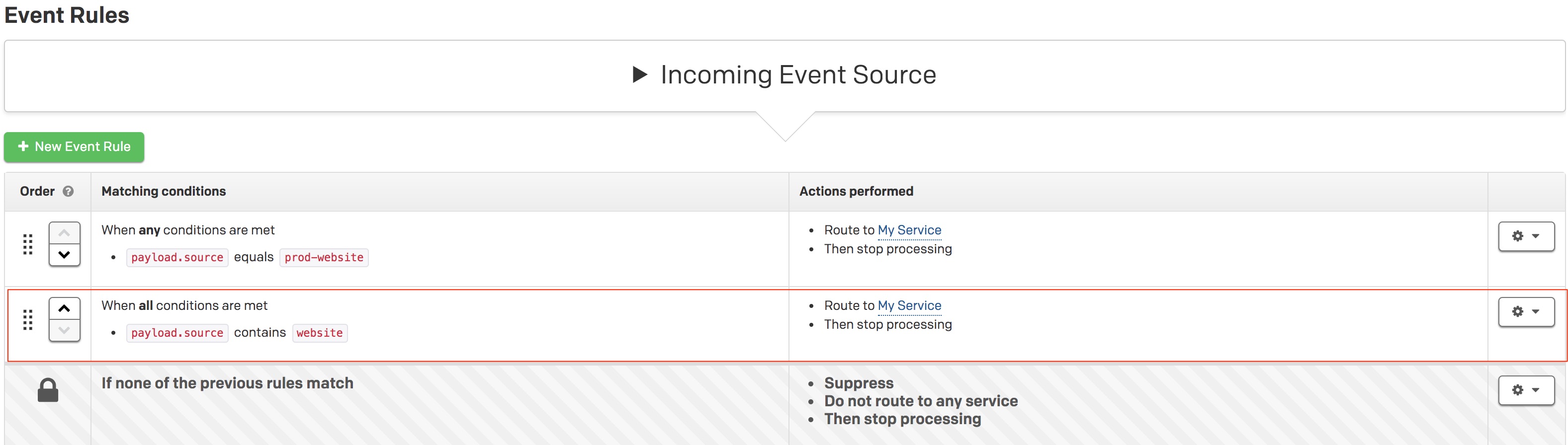
The condition field contains a list of conditions. The first field in the list is and or or, followed by a list of operators and values.
Example Payload
"condition": [
  "and",
  [
    "contains",
    [
      "path",
      "payload",
      "source"
    ],
    "website"
  ]
]
Displayed in the UI
Operators
| Operators | Description |
|---|---|
contains | The field contains a value. |
ncontains | The field does not contain a value. |
exists | The field exists. |
nexists | The field does not exist. |
equals | The field equals a value. |
nequals | The field does not equal a value. |
matches | The field matches a regular expression with RE2 syntax. |
nmatches | The field does not match a regular expression with RE2 syntax. |
The value after the operator is another list. The first element is path, followed by the name of a field. If the field is a child of another field, the full field path can be traversed. For example, given this event payload:
{"parent":{"child":{"grandchild": 1}}}
The following is written in order to use the grandchild field:
[
  "path",
  "parent",
  "child",
  "grandchild"
]
Advanced Condition Parameter
| First Element | Second Element | Third Element | Fourth Element | Fifth Element |
|---|---|---|---|---|
active-between | The start time in milliseconds (number of milliseconds since the Unix Epoch on January 1st, 1970 at UTC). | The end time in milliseconds. | -- | -- |
scheduled-weekly | The start time in milliseconds (number of milliseconds since the Unix Epoch on January 1st, 1970 at UTC). | The duration in milliseconds. | The time zone. | An array of day values. Ex: [1, 3, 5] is Monday, Wednesday, Friday. |
frequency-over | The frequency. | The amount of time to wait before triggering. | The unit of time. Possible values are: “minutes”, “hours”, and “days”. | -- |
Actions
The actions list contains one or more items. Each action within the list is itself a list.
Example
"actions": [
  [
    "route",
    "PABC123"
  ],
  [
    "suppress",
    false
  ],
  [
    "severity",
    "info"
  ]
]
| First Element | Second Element |
|---|---|
route | The service ID of the target service. You can find the service you want to route to by calling the services endpoint. |
suppress | A boolean value indicating whether or not the event should be suppressed. |
severity | One of info, warning, error, critical, or unknown. |
annotate | The note to set on any new incident created as a result of the event rule. |
Update a Global Event Rule
Issue a PUT request to /event_rules/<rule_id> to update an existing global event rule. The parameters are the same as when creating a new global event rule.
Delete a Global Event Rule
Issue a DELETE request to /event_rules/<rule_id> to delete a global event rule.
Example Request
Create a basic routing rule
{
  "condition": [
    "and",
    [
      "contains",
      [
        "path",
        "payload",
        "source"
      ],
      "website"
    ]
  ],
  "actions": [
    [
      "route",
      "PXYZ123"
    ]
  ]
}